Macro Calculator Guide: Free Tools, Tips, and Expert Advice from Eddie Lester

Macro Calculator
Tracking what you eat goes far beyond counting calories; it’s about understanding the nutrients that fuel your body. If you’ve ever wondered why some people lose fat while others gain muscle with the same workout routine, the answer often lies in how they manage their macronutrients, or “macros.”
Flexible dieting, also known as IIFYM (If It Fits Your Macros), has revolutionized how people approach nutrition. Instead of restricting foods, it focuses on hitting your target amounts of protein, carbohydrates, and fats to support your goals. This approach gives you the freedom to enjoy your favorite foods while still making progress whether that’s losing weight, building muscle, or simply maintaining a healthy lifestyle.
Guiding this process is Eddie Lester, a Master Personal Trainer with over 20 years of experience and 10 different certifications, including NASM-CPT, CES, PES, and ACE-CPT. Based in Los Angeles, Lester has helped countless clients achieve real results through practical nutrition strategies and personalized training plans. He is also the author of Business and Sales: The Guide to Success as a Personal Trainer, blending fitness expertise with real-world guidance on reaching your goals efficiently.
With Lester’s insights, using a macro calculator becomes more than just numbers; it’s a roadmap to understanding your body and fueling it the right way.
What Are Macronutrients and Why They Matter
Macronutrients, or “macros,” are the nutrients your body needs in larger amounts to function, move, and grow. They include protein, carbohydrates, and fats, and each plays a unique role in your health and fitness goals. Understanding them is key to using a macro calculator effectively.
Protein
Protein is the building block of muscles, skin, hair, and enzymes. It’s essential for muscle repair and growth, making it especially important if your goal is strength training or bodybuilding. Protein also helps you feel full, which can make weight loss easier.
Carbohydrates
Carbs are your body’s main energy source. They fuel workouts, support brain function, and provide energy for daily activities. Choosing the right carbs, like fruits, vegetables, and whole grains, ensures steady energy levels and helps with performance and recovery.
Fats
Fats are often misunderstood, but they are crucial for hormone production, brain health, and absorbing vitamins. Healthy fats, like those from nuts, avocado, and olive oil, can also keep you satisfied longer and support weight management and overall health.
How Macros Affect Your Goals
- Weight Loss: Higher protein intake can preserve muscle while burning fat.
- Muscle Gain: Balanced carbs and protein fuel workouts and recovery.
- Maintenance: A mix of all three macros keeps energy stable and supports overall health.
Eddie Lester’s approach focuses on practical, flexible nutrition. He emphasizes understanding how each macro works in real meals, rather than overcomplicating tracking. This allows clients to follow a sustainable diet that fits their lifestyle while still hitting fitness goals.
How a Macro Calculator Works
A macro calculator is a tool designed to help you understand how much protein, carbs, and fats you should eat each day to reach your goals. Whether you want to lose weight, build muscle, or simply maintain your current fitness, these tools take the guesswork out of planning your meals. Many of them are free and available online, making it easy for anyone to start tracking their nutrition.
Types of Macro Calculators
There are a few different types of calculators depending on your needs:
- Food Macro Calculator: Lets you input specific foods to see their protein, carb, and fat content. Great for meal planning.
- Macro Calculator for Weight Loss: Helps you set daily macro targets that create a calorie deficit for fat loss.
Bodybuilding Macro Calculator: Focuses on higher protein and energy intake to support muscle growth and recovery.
How Your Calories Are Calculated
Most macro calculators start with calculating your Basal Metabolic Rate (BMR) the number of calories your body needs just to stay alive. Then, they adjust based on your activity level, giving you your Total Daily Energy Expenditure (TDEE).
Here’s a simple way it works:
For Men:
BMR = 10 × weight (kg) + 6.25 × height (cm) – 5 × age + 5
For Women:
BMR = 10 × weight (kg) + 6.25 × height (cm) – 5 × age – 161
Next, the BMR is multiplied by an activity factor:
- Sedentary (little or no exercise) = 1.2
- Lightly active (light exercise/sports 1–3 days/week) = 1.375
- Moderately active (moderate exercise/sports 3–5 days/week) = 1.55
- Very active (hard exercise/sports 6–7 days/week) = 1.725
- Extra active (very hard daily exercise or physical job) = 1.9
Example:
A 70 kg moderately active male, 175 cm tall, 30 years old:
- BMR = 10×70 + 6.25×175 – 5×30 + 5 = 1,672.5 calories/day
- TDEE = 1,672.5 × 1.55 ≈ 2,592 calories/day
From there, the macro calculator splits your daily calories into percentages of protein, carbs, and fats depending on your goal: weight loss, maintenance, or muscle gain.
This simple formula, combined with flexible tracking, makes using a macro calculator free or paid an effective way to plan your nutrition without feeling restricted.
Calculating Your Macros With a Macro Calculator
Using a macro calculator is easier than most people think. With a step-by-step approach, you can figure out exactly how much protein, carbs, and fats to eat each day, whether your goal is weight loss, muscle gain, or maintenance.
Step-by-Step Guide to Using a Macro Calculator
- Enter your personal details: Age, sex, height, weight, and activity level.
- Set your goal: Choose whether you want to lose weight, build muscle, or maintain your current weight.
- View your recommended calories: The calculator will provide your TDEE based on your activity level and goal.
- Check your macro breakdown: Most calculators show percentages of protein, carbs, and fats.
- Convert percentages to grams:
- Protein: 1 gram = 4 calories
- Carbs: 1 gram = 4 calories
- Fats: 1 gram = 9 calories
Example:
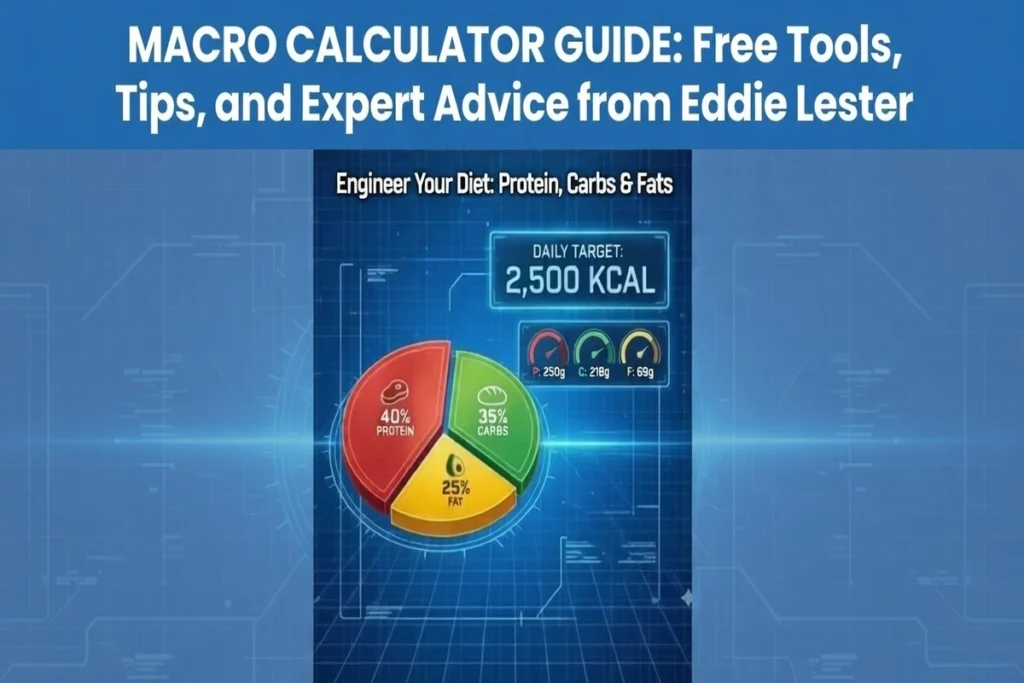
If your TDEE is 2,500 calories and your macro split for weight loss is 40% protein, 40% carbs, 20% fat:
- Protein: 2,500 × 0.4 ÷ 4 = 250 grams
- Carbs: 2,500 × 0.4 ÷ 4 = 250 grams
- Fat: 2,500 × 0.2 ÷ 9 ≈ 56 grams
Customizing Your Macros for Different Goals
- Weight Loss: Focus on higher protein to preserve muscle, moderate carbs for energy, and lower fats.
- Muscle Gain / Bodybuilding: Increase calories with more carbs and protein to fuel workouts and recovery.
- Maintenance: A balanced ratio of protein, carbs, and fats to support daily energy needs without weight changes.
Eddie Lester’s Tips for Accurate Tracking
- Weigh your food: Use a kitchen scale for precise measurements.
- Track consistently: Make it a daily habit rather than occasional logging.
- Adjust as you go: Your macros aren’t fixed update them as your weight, activity level, or goals change.
- Focus on protein first: Prioritize meeting protein targets before worrying about carbs or fats.
- Use a flexible approach: Don’t stress over perfection. Flexible dieting lets you enjoy foods you like while hitting your numbers.
By following these steps and tips from Eddie Lester, using a macro calculator free becomes a practical, stress-free way to manage your nutrition and hit your fitness goals effectively.
Your macro numbers are based on your total calorie needs. If you don’t know your daily calorie burn yet, calculate it using our TDEE calculator.
Best Practices for Tracking Macros
Tracking your macros doesn’t have to be complicated. With the right approach, it can be simple, flexible, and effective. Here are some practical tips from Eddie Lester, Master Personal Trainer and nutrition expert:
Track Consistently
Consistency is key. Logging your meals every day even if not perfectly gives you a clear picture of your nutrition and progress. Daily tracking helps you spot trends and make smarter adjustments over time.
Use Apps and Tools
Take advantage of technology. Apps like MyFitnessPal or macro-specific calculators make it easier to log foods, scan barcodes, and track your daily macros. Even a food macro calculator can simplify meal planning and portion control.
Adjust Macros Based on Progress
Your body changes over time, so your macros should too. If you’re not seeing results whether it’s fat loss, muscle gain, or maintaining weight, tweak your protein, carb, or fat intake slightly. Tracking allows you to make these adjustments scientifically rather than guessing.
Make Macro Tracking Flexible
Flexible dieting means you don’t have to give up your favorite foods. Build your plan around nutrient-rich meals first, then leave room for treats. This helps you stick with your plan long-term and enjoy the process without stress.
Popular Macro Ratios for Different Goals
Macro ratios can vary depending on your goals. Here’s a simple guide to the most common splits:
Weight Loss
- Protein: 40%
- Carbs: 40%
- Fats: 20%
Higher protein helps preserve lean muscle while creating a calorie deficit for fat loss.
Muscle Gain / Bodybuilding
- Protein: 30–35%
- Carbs: 40–50%
- Fats: 20–30%
Carbs fuel your workouts and recovery, while protein supports muscle growth.
Maintenance
- Protein: 30%
- Carbs: 40%
- Fats: 30%
Balanced macros help sustain energy levels and keep your weight stable.
Optional Diets
- Keto: High fat (70–80%), very low carbs (5–10%), moderate protein (15–25%)
- Low-Carb: Carbs 20–30%, protein 40%, fats 30–40%
- High-Protein: Protein 40–50%, carbs 30–40%, fats 20–30%
These ratios are just starting points. With a macro calculator free, you can personalize your intake based on your body, activity level, and goals. Eddie Lester emphasizes using these numbers as a guide, not a strict rule, allowing flexibility while still achieving results.
Common Mistakes to Avoid
Even with the best tools, tracking macros can go wrong if you fall into common pitfalls. Eddie Lester highlights the mistakes to watch out for so your nutrition stays effective and stress-free:
Overcomplicating Tracking
Many people think they need to track every bite perfectly. In reality, consistency matters more than perfection. Focus on logging your meals regularly rather than obsessing over tiny details.
Ignoring Protein or Food Quality
Protein is crucial for muscle repair, fat loss, and overall health. Don’t sacrifice protein intake for carbs or fats. Also, prioritize whole, nutrient-rich foods instead of only counting calories. Quality matters as much as quantity.
Relying Only on Calorie Numbers
Calories alone don’t tell the full story. Two meals with the same calories can affect your body differently depending on their macro composition. Always consider protein, carbs, and fats in addition to total calories.
Not Adjusting Macros Over Time
Your body changes as you lose fat, gain muscle, or change activity levels. Sticking to the same macro numbers for months can slow progress. Reassess and tweak your macros every few weeks to stay on track.
Free Macro Calculator Options
If you’re just starting out, a free macro calculator is a great way to plan your meals and track progress without investing in expensive tools. Here’s a quick guide:
Best Macro Calculator Free
Look for calculators that let you input age, weight, height, activity level, and goals. The output should give a clear breakdown of protein, carbs, and fats in both percentages and grams.
Free Macro Calculator for Weight Loss
These calculators are designed to create a calorie deficit while prioritizing protein to preserve lean mass. They make it easy to set daily targets and stay on track without guesswork.
Macro Calculator Thyga
If trending tools like Macro Calculator Thyga are popular in your community, they can provide specialized options for bodybuilding, keto, or other diets. Always check reviews and usability before choosing.
How to Pick the Right Tool
- Make sure it’s user-friendly and allows customization.
- Choose one that provides both percentages and grams for each macro.
- Look for extra features like food logging, progress tracking, and meal planning suggestions.
Using the right macro calculator free can save time, reduce stress, and help you hit your goals more efficiently. Eddie Lester recommends starting with a simple, reliable tool, then adjusting as you learn more about your body’s needs.
Knowing your lean body mass can help you set better macro targets. Use our body mass calculator to check yours.
FAQs:
Can I eat carbs at night?
Yes! Timing carbs around your meals or workouts can actually help with energy and recovery. What matters most is daily totals, not the exact time you eat them. Flexible dieting allows you to enjoy carbs at any time while still hitting your macros.
How many grams of protein per kg of body weight?
A good guideline is:
- General health: 0.8–1 g per kg of body weight
- Weight loss or fat loss: 1.2–1.6 g per kg
- Muscle gain / bodybuilding: 1.6–2.2 g per kg
Eddie Lester emphasizes prioritizing protein first, as it’s essential for preserving muscle and supporting recovery.
Are macros bad for belly fat?
Macros themselves aren’t bad. Belly fat is usually caused by excess calories over time, not carbs or fat specifically. Tracking macros helps you manage calories while still eating a balanced diet, which can support fat loss, including around the belly.
What happens if I eat too many carbs?
Eating more carbs than your body needs can lead to excess calories being stored as fat. However, carbs are also your main energy source, so the key is balance. A macro calculator for weight loss or maintenance can guide you to the right amount based on your goals.

Adeel Anwar
Read more from the category
![TDEE Calculator: Why Most Calorie Calculations Are Wrong [Expert Analysis]](https://www.fitnessmentors.com/wp-content/uploads/2025/10/TDEE-Calculator-Why-Most-Calorie-Calculations-Are-Wrong.webp)
TDEE Calculator: Why Most Calorie Calculations Are Wrong [Expert Analysis]
Learn Body Mass (LBM) Calculator for Body Fat Percentage